URKit: Native C++ MCP framework for Unity modding workflows
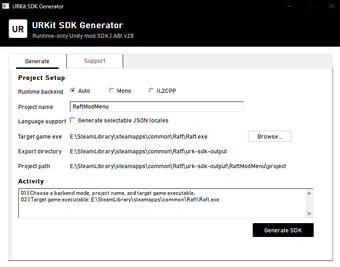
URKit, developed by Jadis0x, is a native C++ framework that links Unity games to AI-assisted mod development. It exposes a Model Context Protocol server over stdio for local model interactions and produces native code artifacts to accelerate low-level modifications. The tool embeds an in-game UI and supports common graphics backends, targeting game modders and reverse engineers who write native modules and want direct, runtime-aware assistance from language models during the development loop.
What tasks can you actually use it for?
URKit targets low-level modification workflows by enabling live inspection and code generation against a running process. The design helps automate hook creation, examine runtime objects, and produce native project scaffolding so developers can move from reverse engineering to compiled modules faster. Use cases include generating C++ bindings for engine types, creating runtime hooks, and building in-game debug interfaces that expose internal state to developers.
How reliable are its AI-assisted code outputs?
The framework integrates with language models through a standardized exchange, and it is built to generate C++ headers and mod scripts as part of that loop. The project documentation describes producing complex modding scripts with high precision, yet generated code reflects the model’s suggestions and the local metadata provided. Developers should validate and test produced hooks and native files before deploying into sensitive runtime environments.
What file formats and environments does it accept?
URKit is designed for Windows desktop development and supports both x86 and x64 process targets. Communication runs via a stdio-based MCP server paired with a local Windows named pipe to the bridge DLL, and runtime modules can be loaded using proxy or injector modes. Typical integration points include native code projects, detouring libraries for hook management, and direct interaction with engine metadata exported by the tooling.
Is it practical for existing native modding workflows?
The tool provides a client-neutral development loop that lets different MCP hosts connect to the same server, which helps fit AI-assisted steps into established workflows. For teams that maintain native C++ toolchains and use runtime hooking libraries, the framework plugs into compile-and-inject cycles and offers an in-game interface for quick verification. Adoption requires familiarity with native build systems and runtime debugging practices.
Who should adopt URKit and what to expect
URKit suits developers who work in native C++ and need direct, runtime-linked AI assistance during mod development; it provides a focused bridge between analysis and compiled modules. Teams that prefer high-level scripting or require cross-platform toolchains may find the Windows-native, compile-centric approach a poor fit. Expect a workflow that emphasizes local tooling, iterative testing, and manual review of any AI-generated native code.